
Roles & Access Control
- # Introduction
- # Roles & Permissions
- # Module Access
- # Field Access
- # Menu Access
- # Checking access in code
Introduction
LaraAdmin controls access on four levels:
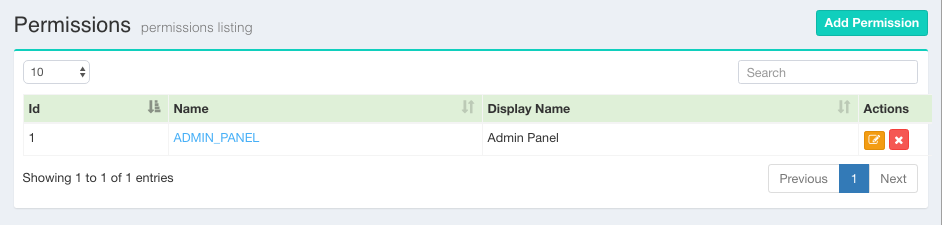
- Roles & permissions: who may open the admin panel at all (the
ADMIN_PANELpermission), and who is Super Admin. - Module access: per role and module, whether the role may view, create, edit and delete records.
- Field access: per role and field, whether the field is invisible, read-only or writable.
- Menu access: which sidebar menu items a role sees.
Roles and permissions use laraadmin/entrust 7.0, our maintained fork of Zizaco/Entrust for Laravel 12 and 13.
Roles & Permissions
Manage roles at /admin/roles and permissions at /admin/permissions. A role has a name (e.g. SALES_MANAGER), a display name, a parent role, a department, and a context: Employee roles are for staff, Customer roles for customers.
SUPER_ADMINhas access to everything. Module Manager, Menus, Configure and the code generators are for the Super Admin only.- A new role gets the
ADMIN_PANELpermission and read-only access to every module. Give it more on the role's Access tab. - Permissions are named flags (
ADMIN_PANEL, or your own such asAPPROVE_ORDERS) given to roles on the permission's page. Check them with$user->can('APPROVE_ORDERS'). - Since 1.13.1, employee forms can't give the Super Admin role, and only the employee themself or the Super Admin can change an employee's password.
Module Access
Set module access for one role on all modules (Roles → role → Access), or for one module and all roles (Module Manager → module → Access). Access is stored in role_la_module (acc_view, acc_create, acc_edit, acc_delete). A user has access when any of their roles has it.
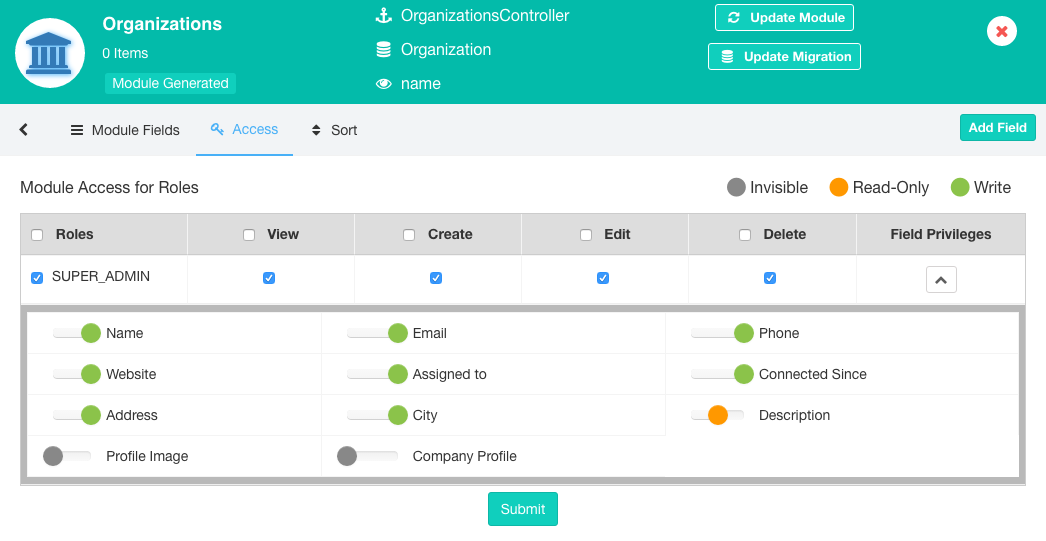
Generated controllers check module access in every action:
| Access | Allows |
|---|---|
| View | The listing, its data (*_dt_ajax), the record page, search and quick-add dropdown values |
| Create | The Add button and saving new records (including quick add) |
| Edit | The edit form and saving changes |
| Delete | Deleting records |
For Backups, create access is also needed to download a backup.
Field Access
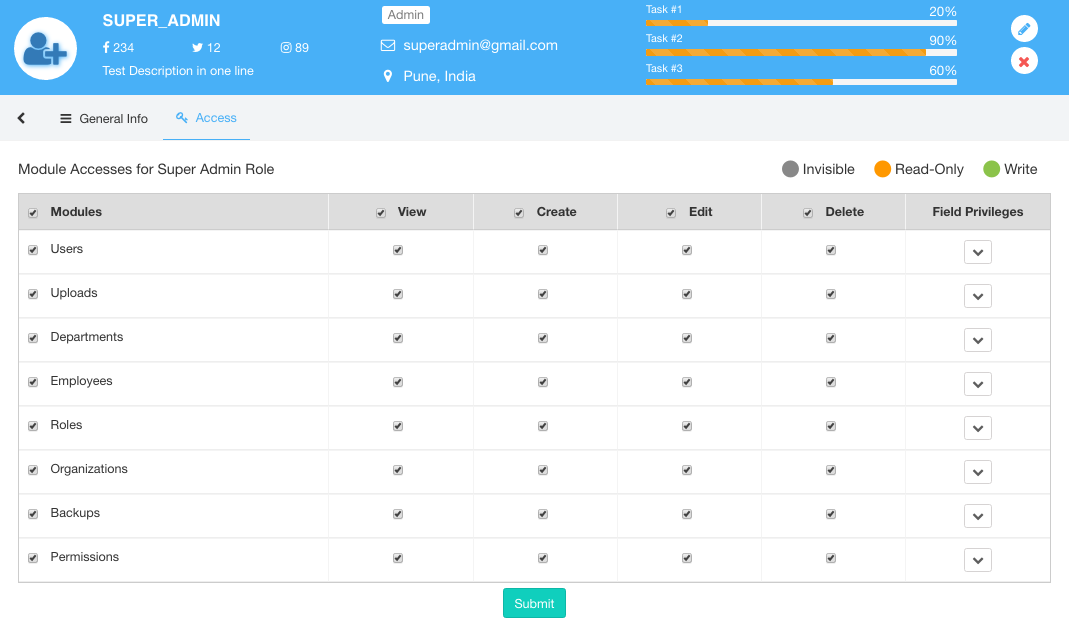
Each field has one of three access levels per role, stored in role_la_module_fields:
- Invisible: not shown anywhere.
- Read-only: shown, but not in the forms.
- Write: shown and editable.
Full module access gives Write on all fields, read-only module access gives Read-only. The forms (@la_form, @la_input) and display helpers (@la_display) leave out fields the user can't see or write. Since 1.13.1, saving also ignores fields the user may not write, so a crafted request can't change them.
Menu Access
Each menu item is shown to the roles that have it (role_la_menu). Set this in the Menu Manager. Hiding a menu item doesn't block the module: use module access for that.
Checking access in code
Routes & middleware
Entrust's middleware are registered as role, permission and ability in app/Http/Kernel.php. routes/admin.php has two groups:
// Super Admin only: Module Manager, menus, configuration
'middleware' => ['web', 'auth', 'permission:ADMIN_PANEL', 'role:SUPER_ADMIN']

// Everyone with the admin panel permission: the modules (access checked in each controller)
'middleware' => ['auth', 'permission:ADMIN_PANEL']
Generated routes go into the second group. Put your own admin routes there too, and check module access in the controller.
Controllers
use App\Models\LAModule;

if (LAModule::hasAccess('Courses', 'edit')) { ... }               // view, create, edit, delete
if (LAModule::hasFieldAccess('Courses', 'fees', 'write')) { ... }  // view, write

// Return 403 like the generated controllers do
if (! LAModule::hasAccess('Courses', 'view')) {
    return response()->json(['status' => 'error', 'message' => 'Unauthorized Access'], 403);
}

Auth::user()->hasRole('SUPER_ADMIN');
Auth::user()->can('ADMIN_PANEL');
Both hasAccess() and hasFieldAccess() accept a module / field name or id, and an optional user id (the logged-in user by default).
Blade views
@la_access("Courses", "create")
    <button class="btn btn-success" data-toggle="modal" data-target="#AddModal">Add Course</button>
@endla_access

@la_field_access("Courses", "fees", "view")
    {{ $course->fees }}
@endla_field_access

@role('SUPER_ADMIN') ... @endrole
@permission('ADMIN_PANEL') ... @endpermission
@ability('SUPER_ADMIN,ADMIN', 'ADMIN_PANEL') ... @endability
Cache
When the cache store supports tags (Redis, Memcached), Entrust caches each user's roles and permissions. LaraAdmin clears that cache when roles and permissions change in the admin panel. If your own code attaches roles or permissions, clear it too, or the change only applies when the cache expires:
$user->attachRole($role);
\App\Helpers\LAHelper::clearAccessCache();